
When choosing a UV printer, one of the most common questions customers ask is:
“What printhead does this machine use? Epson, Ricoh, or Kyocera—which one is better?”
The printhead is the core component that actually “ejects ink” in a UV printer. It directly affects print accuracy, speed, stability, ink compatibility, and the overall price of the machine. But a printhead is not simply “the more expensive, the better,” nor is one brand necessarily suitable for all products. The truly professional selection logic is: what product + what ink + what speed + what precision requires what printhead.
Today, this article will help you understand the mainstream printhead brands used in UV printers and what applications they are suitable for.
- First, Understand One Core Concept: Printheads and Inks Are Not Simply One-to-One
Many people mistakenly believe:
“This printhead corresponds to this ink, and that printhead corresponds to that ink.”
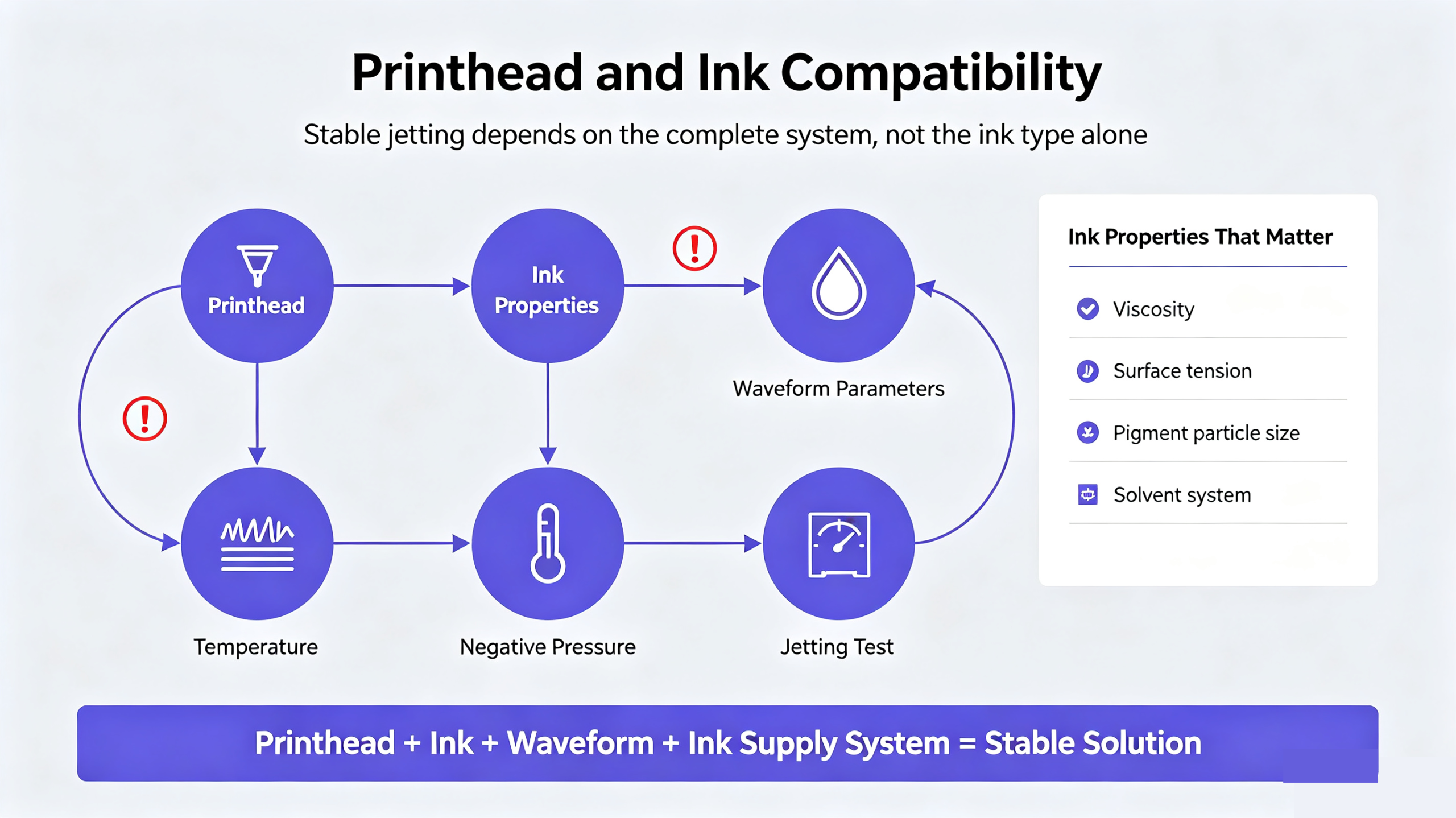
In reality, the relationship between printheads and inks is far more complex. The real relationship is closer to:
Printhead → Ink physical properties → Waveform parameters → Temperature → Negative pressure → Jetting test → Final confirmation of compatibility
Because different inks can differ in viscosity, surface tension, pigment particles, solvent system, and more.
So whether an ink can be used is not just a matter of “whether it is UV ink.” It depends on whether:
Printhead + Ink + Drive waveform + Ink supply system
can form a stable match.
This is also why the same printhead may perform completely differently after switching to another ink.
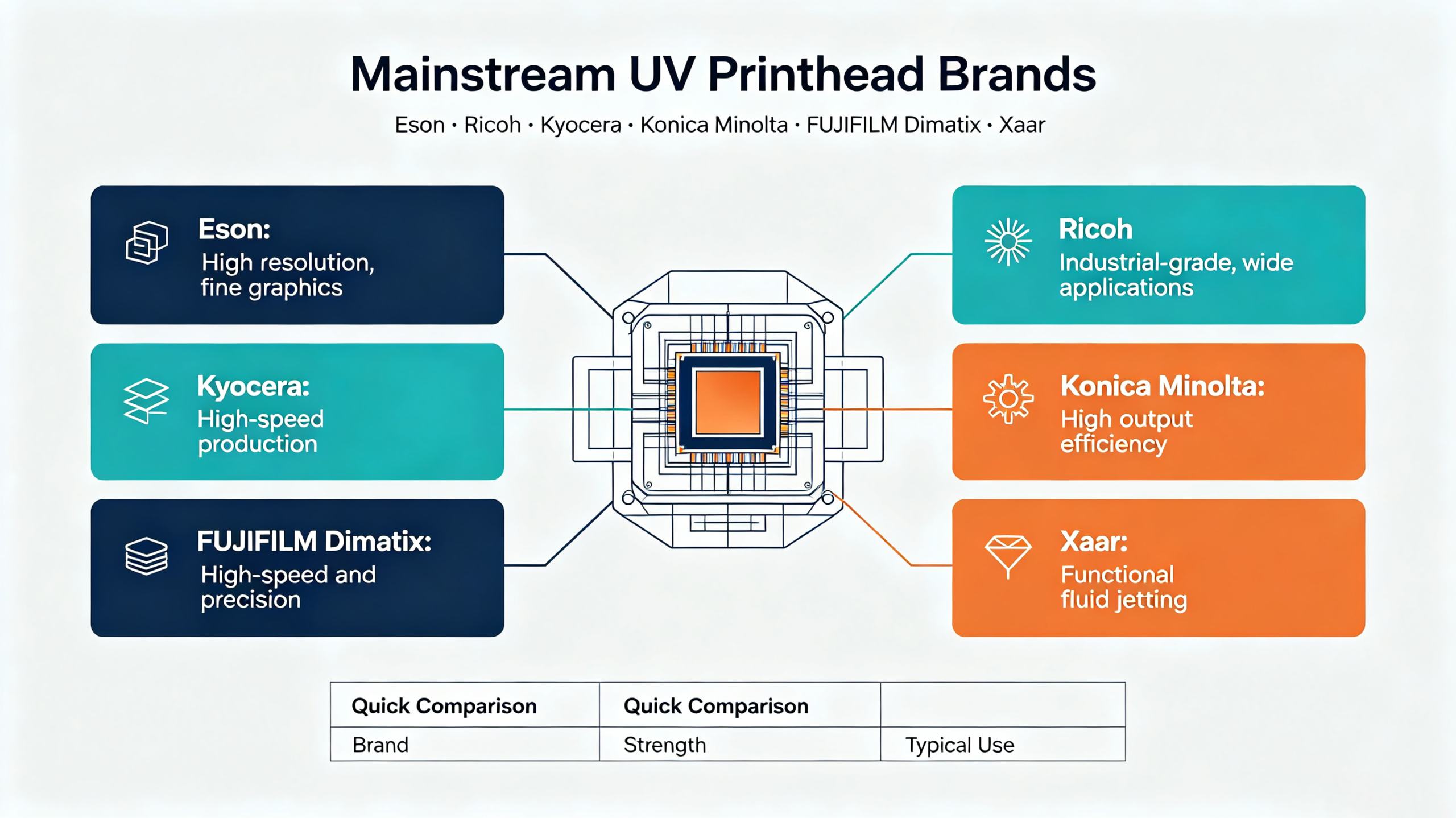
- Overview of Mainstream UV Printer Printhead Brands
At present, the printhead brands worth knowing in the industrial inkjet field include:
Epson, Ricoh, Kyocera, Konica Minolta, FUJIFILM Dimatix, and Xaar.
Each has its own characteristics and application directions.
- Epson: High-Resolution, Fine Image Route
Epson industrial printheads mainly use PrecisionCore micro-piezo technology. Common industrial printheads include:
- I3200
- I1600
- S3200
- S800
Some models explicitly support UV ink, while others support water-based ink, eco-solvent ink, etc. For example, Epson official data shows that the S3200 supports water-based, UV, and eco-solvent inks; the S800 supports water-based and UV inks.
What is Epson suitable for?
Epson printheads are commonly found in:
- Advertising photo printing
- UV flatbed
- Small industrial printing
- Digital printing
- UV roll-to-roll/flatbed equipment
It is often regarded as a high cost-performance, high-resolution option. In particular, equipment that pursues fine image quality, fine text, small characters, and image details tends to pay more attention to Epson solutions.
- Ricoh: Highly Industrialized, Broad Application Range
Ricoh is very important in the industrial inkjet field. Common series include:
- MH series
- TH series
- GH series
Many MH series models support UV, solvent, water-based, and other types of ink. For example:
- MH5420/5440: Official data shows support for UV, solvent, water-based, and other inks, as well as multi-drop grayscale printing.
- MH5421F/MH5421MF: Also supports an ink circulation structure.
What is Ricoh suitable for?
Ricoh printheads have a very wide range of applications:
- UV flatbed printing
- UV roll-to-roll printing
- Advertising signage
- Industrial decoration
- Labels
- Packaging
- Industrial inkjet
In Ricoh’s officially published compatible ink list, you can see that its printheads have been tested with inks from many UV ink manufacturers, such as Agfa, Sun Chemical, Sakata INX, etc.
Simply put:
Ricoh printheads have a high degree of industrialization, a broad application range, and relatively strong adaptability to different ink systems.
- Kyocera: A Representative of High-Speed Industrial Printing
Kyocera industrial printheads are very representative in the direction of high-speed industrial printing. For example, the KJ4A series can reach very high maximum drive frequencies.
In Kyocera official product data, the KJ4A-EX1200-RC supports UV ink, with a resolution of up to 1200 × 1200 dpi, and uses an internal ink circulation design.
What is Kyocera suitable for?
Kyocera is relatively suitable for:
- High-speed industrial printing
- Labels
- Packaging
- Decoration
- High-throughput industrial equipment
If you see a machine emphasizing “high speed, high throughput, industrial-grade continuous production,” then Kyocera printheads are worth paying attention to.
But Kyocera also specifically emphasizes:
Not every ink can be used directly. Compatibility must be confirmed through jetting tests and soak tests.
- Konica Minolta: Industrial-Grade, High Production Efficiency
Konica Minolta is also a very important brand in the industrial inkjet field. Its printhead products have long been used in:
- Wide-format printing
- UV printing
- Labels
- Industrial printing
These printheads usually lean more toward the industrial-grade and high-production-efficiency route. In UV printing equipment, especially, you can see solutions oriented toward high ink volume and high speed.
So when you look at UV printer specifications in the future and see “Konica Minolta,” do not simply understand it as an “ordinary printer brand.” In the industrial inkjet field, it is itself an important printhead supplier.
- FUJIFILM Dimatix: Industrial-Grade, High-Speed, High-Precision
Many people may be unfamiliar with the name:
FUJIFILM Dimatix.
In fact, it is also a very important global industrial inkjet printhead manufacturer. Representative products include:
- SAMBA
- STARFIRE
- S-Class
- Q-Class
For example:
- STARFIRE SG1024 A series: Supports water-based, solvent, UV, and other inks, and is used in textiles, wide-format advertising, commercial printing, decorative printing, and other fields.
- SAMBA G3L: Leans more toward high-speed commercial printing, UV labels, flexible packaging, PCB manufacturing, and other applications.
So one obvious characteristic of Dimatix is:
industrial-grade, high-speed, high-precision.
- Xaar: Industrial Manufacturing and Functional Fluid Jetting
Xaar is also a very classic brand in the industrial inkjet industry, such as the Xaar 1003 series. It supports UV, solvent, oil-based, and other fluids.
Xaar strongly emphasizes industrial manufacturing and functional fluid jetting. Applications can involve:
- Glass
- Ceramics
- PCB
- Electronics manufacturing
- Photovoltaics
- 3D printing
So Xaar is not just a “printer printhead.” It has actually entered the larger field of industrial material deposition.
- A Table to Understand the Differences Between Mainstream Printheads
Printhead Brand | Typical Products/Series | Common Ink Direction | Typical Application Direction |
Epson | I3200, I1600, S series | UV, water-based, some solvent | UV printing, advertising, photo printing, fine images |
Ricoh | MH, TH, GH series | UV, water-based, solvent, etc. | UV flatbed, roll-to-roll, advertising, industrial decoration |
Kyocera | KJ series | UV, water-based, etc. | High-speed industrial printing, packaging, labels |
Konica Minolta | KM series | UV and other industrial inks | Wide format, UV, industrial printing |
Fujifilm Dimatix | STARFIRE, SAMBA | UV, water-based, solvent, etc. | High-speed printing, packaging, textiles, industrial manufacturing |
Xaar | Xaar 1003, etc. | UV, solvent, oil-based, etc. | Ceramics, glass, PCB, industrial manufacturing |
Special note:
“Common ink direction” does not mean “any ink of that type can be used casually.”
The specific compatibility relationship must be based on: specific printhead model + ink model + manufacturer test results.
For example, Ricoh officially provides a tested ink list directly, rather than simply telling users that “all UV inks can be used.”
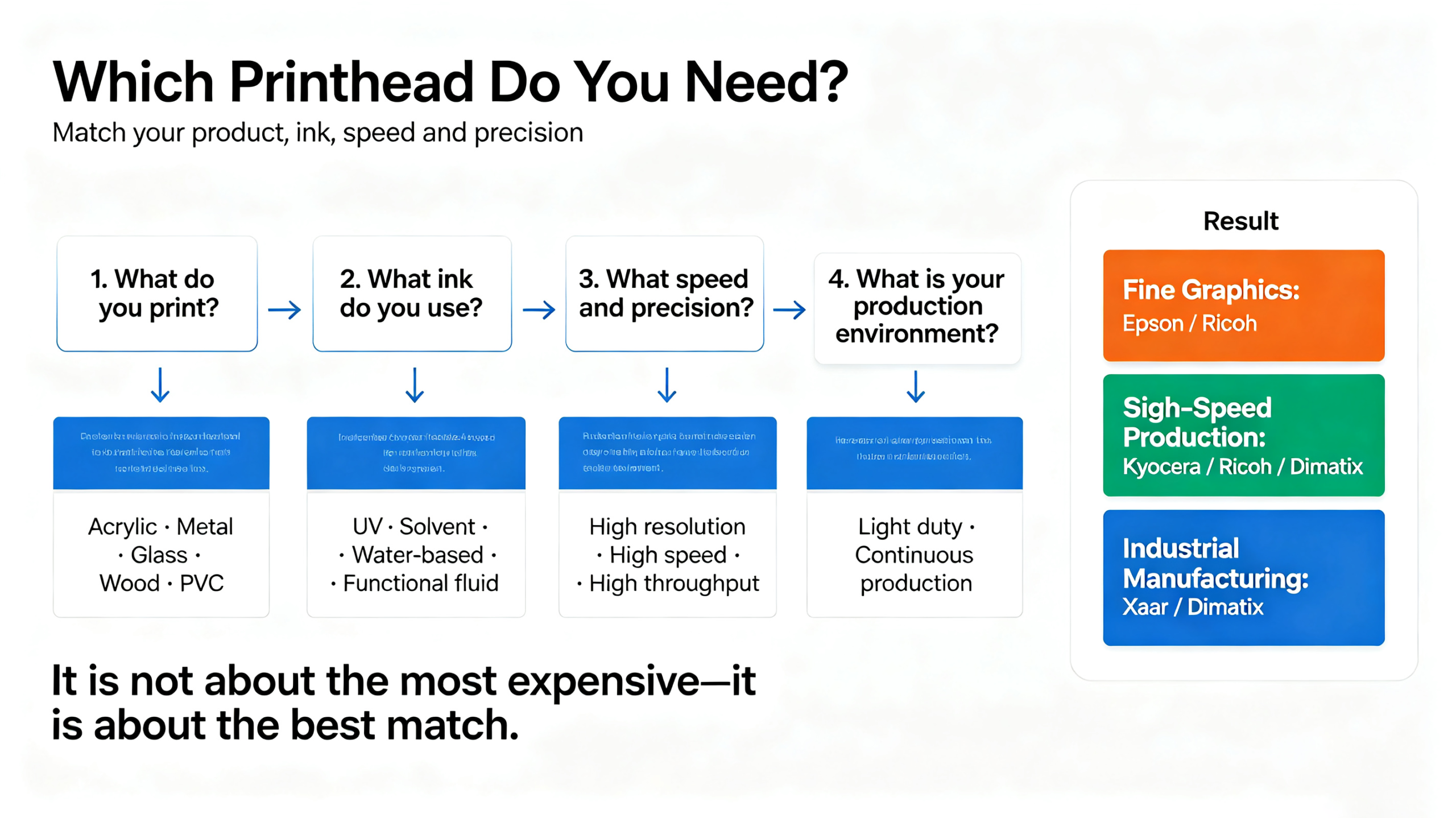
- So Which Printhead Is Actually Suitable for Which Product?
If we understand this from actual UV printer applications, we can simply look at it this way:
- Small Advertising, Phone Cases, Acrylic, PVC, Glass, Metal, Wood
If you mainly print:
- Phone cases
- Acrylic
- PVC
- Glass
- Metal
- Wood
- Small advertising products
A common approach is:
Epson / Ricoh / Konica Minolta and other solutions oriented toward UV graphic printing.
- High Speed, Large Format, Continuous Production
If you mainly pursue:
- High speed
- Large format
- Continuous production
Then you can focus on:
Ricoh, Kyocera, Dimatix, Xaar, and other industrial-grade printhead solutions.
- PCB, Electronics Manufacturing, Glass, Ceramics, Functional Materials
If you enter industrial fields such as:
- PCB
- Electronics manufacturing
- Glass
- Ceramics
- Functional materials
Then printhead selection cannot only look at “whether the printing effect is good.” It must look at more professional parameters such as:
- Ink compatibility
- Jetting stability
- Circulation capability
- Drop size
- Chemical resistance
- Material adaptability
- Why Does the Same Printhead Produce Different Results When the Ink Is Changed?
This is actually a very important question.
Suppose the same printhead:
Using Ink A, printing is normal.
Switch to Ink B, and the following may occur:
- Missing lines
- Ink spatter
- Drop size variation
- Color shift
- Even reduced printhead life
Why?
Because the ink’s viscosity, surface tension, particle size, and solvent system all affect printhead jetting. Even the printhead drive waveform needs to be re-matched.
So professional UV printing equipment debugging is absolutely not “pour in the ink and it will print.” It is a joint matching process of:
Printhead + Ink + Waveform + Ink supply system
- Do Not Simply Ask: “Which Printhead Is the Best?”
This is a very typical question in the UV printing industry:
“Is Epson better, or Ricoh?”
In fact, the question itself is incomplete.
You should first ask:
“What product do I want to print?”
Then ask:
- What speed is needed?
- What precision is needed?
- What ink volume is needed?
- What UV ink is used?
- What is the material?
- How many hours per day will it print?
Only then can you determine:
which printhead is more suitable.
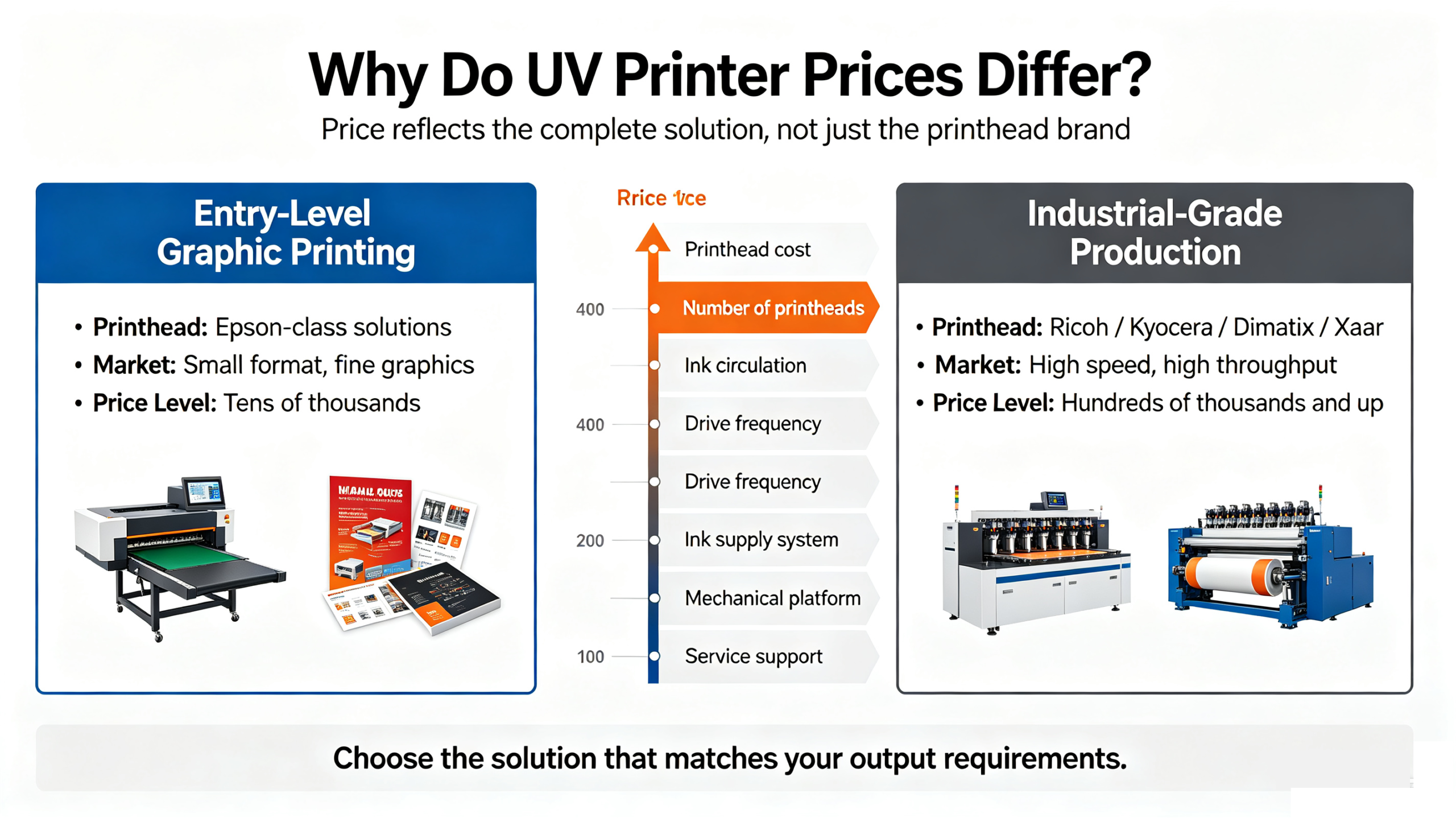
- Why Do Some UV Printers Cost Tens of Thousands, While Others Cost Hundreds of Thousands?
Many customers also ask:
“Why do some UV printers with Epson printheads sell for only tens of thousands of RMB, while some machines with Ricoh or Kyocera printheads can sell for hundreds of thousands or even more?”
The reason is not just the different printhead brand. It also includes:
- The cost of the printhead itself
- The number of printheads
- Industrial-grade design and lifespan
- Whether ink circulation is supported
- Drive frequency and throughput
- The complete machine’s ink supply system, control system, and mechanical platform
- Stability and continuous production requirements
- After-sales and technical support costs
Epson solutions are commonly used in small-to-medium format, fine graphic, advertising photo printing, and other scenarios, and the complete machine can be priced at tens of thousands of RMB.
Industrial printheads such as Ricoh and Kyocera, especially multi-printhead, high-throughput, continuous-production configurations, can easily reach hundreds of thousands of RMB or even more.
So behind the price difference is the different positioning of the entire solution.
Summary
The UV printer printhead market is not just one brand.
At present, the brands worth knowing in the industrial inkjet field include:
- Epson
- Ricoh
- Kyocera
- Konica Minolta
- FUJIFILM Dimatix
- Xaar
Each has different nozzle counts, resolutions, drop sizes, jetting frequencies, circulation methods, ink compatibility ranges, and application directions.
So the truly professional selection logic is not:
“Which printhead is the best?”
It is:
“What product + what ink + what speed + what precision requires what printhead?”
If you are choosing a UV printer, it is recommended to first clarify your printing material, throughput requirements, precision requirements, and budget, and then make a comprehensive judgment based on the printhead, ink, waveform, and ink supply system. Only a matching solution is truly stable, easy to use, and profitable.